Showing posts with label e-portfolio. Show all posts

September 25, 2014

Teens and Tumblr: a writing digital portfolio


The objective of this post is to share a writing project I've been developing with EFL teenage students this semester. At the end of each unit, the course book we've been using suggests a writing task for a portfolio.


I've always been bothered by the way teenagers generally handle their written assignments at the school where I work. It usually goes as following:

  • Students write a text on a piece of paper which is given to the teacher for correction.
  • Teachers correct the mistakes by underlining, crossing out and sometimes providing a better word for a sentence. The pieces of paper are handed back to students with a mark.
  • Upon receiving their text back, students check their marks and quickly check what the teacher has corrected.
I frequently asked myself: What do students do with this piece of paper? Do students understand why they made the mistakes the teacher marked? How much do they learn from the feedback?

Considering the scenario shared above, I decided to propose a change to my students. First, I elicited from them what usually happens when they have to write texts for homework. And then I presented the idea of a Writing Digital Portfolio to be developed by each student throughout the semester.


The idea was to implement the following changes for the writings at the end of each unit. First, students would write a draft on a piece of paper and bring to class. During one of the class activities when students are busy writing, I would check all the drafts, underline mistakes and leave hints about what is wrong with what I underlined. I would focus on underlining mistakes which I believe my students would be able to identify themselves if pointed in the right direction. Second, students would edit the text marked by the teacher, try to identify and correct the mistakes and publish the final version on a public portfolio. As a tool, I suggested TUMBLR as students could easily publish texts and images either from their cell phones or their laptops. Finally, I would evaluate the final version.


My aim was to try a simple version of process writing, invite students to reflect about their writings, to collect each student's writing on a single page and have something tangible of what is produced by students during the semester.

We've been working together for 2 months and a half now and students are about to publish their third writing. The texts are fairly short (about 100 words), but they have been of great help to me as evidence of what my students have learned and what they haven't learned yet.

Screenshot of a Protopage with the Portfolio being developed by students.
In order to see the portfolios, you can click on the image above, and then click on the names of the students. Or you can click on the links of some portfolios I bring below:


May 26, 2014

Sharing your digital production with Tackk


I love exploring tools which allow our students to share what they produce using English. This week, I noticed Tackk for the first time. This post has the objective to briefly explain how it works and also share some examples of tackk projects and assignments which I've come across.

WHAT CAN YOU PRODUCE WITH TACKK?

Tackk allows you to publish photos, videos, audios, maps and forms. It's great for digital portfolios, assignments, promoting events, storytelling, book and film reports and so much more, all it's needed is your creativity. The site is free and it's DEVICE NEUTRAL, a term I learned from Lisa Johnson today. And what does that mean? It works on laptops, Ipads, and cell phones (IOS and androids), therefore it's perfect for BYOD. Students can create a tackk page without signing up, however, it is deleted after one week. If you wish to have your content saved, consider creating your free account. https://tackk.com/

To learn how it works, watch the tutorial below:


For references on how teachers have been using it, I suggest the reading of two blog posts and the TACKK education page:


As I believe we can learn a lot by checking examples, these are some I've collected:

Try scrolling the image above to see the rest of this tackk page.


MORE EXAMPLES:
  • This assignment was to answer the question "How would you increase the peace?"  Students added the tag #PeaceDay2013, this way all the pages created by them can be found on the same board. https://tackk.com/board/peaceday2013


Have you ever had your students use Tackk
If so, please use the comment area to share your project with us.


July 11, 2013

E-portfolios and Webfolios: the same thing?

First of all, what are e-portfolios? And are e-portfolios and webfolios the same?

As I am a highly visual learner, I've selected two very interesting videos on the topic.

"It's an easily accessible online area where you store all you think is important to your career development."


"They serve as a student's professional digital footprint showcasing a combination of student's work in different formats over a period of time."


 A key word mentioned in this last video is REFLECTION. I'm a great fan of e-portfolios myself  as it can help learners reflect about their  own learning and it's EVIDENCE of what students have learned.

In my opinion, the use of e-portfolios is one of the best ways to evaluate student's progress as well.

In order to help me understand more about e-portfolios, I've also read some articles about their use in education.

An article I really enjoyed reading was
"Portfolios to Webfolios and Beyond: Levels of Maturation" written in 2004 by Douglas Love, Paul Gathercoal and Gerry McKean. In the article, the authors describe different levels of maturation when adopting e-portfolios as an educational tool. The image bellow taken from the article is the taxonomy developed by them.


They also make a distinction between e-portfolios and webfolios.

http://www.educause.edu/ero/article/portfolios-webfolios-and-beyond-levels-maturation

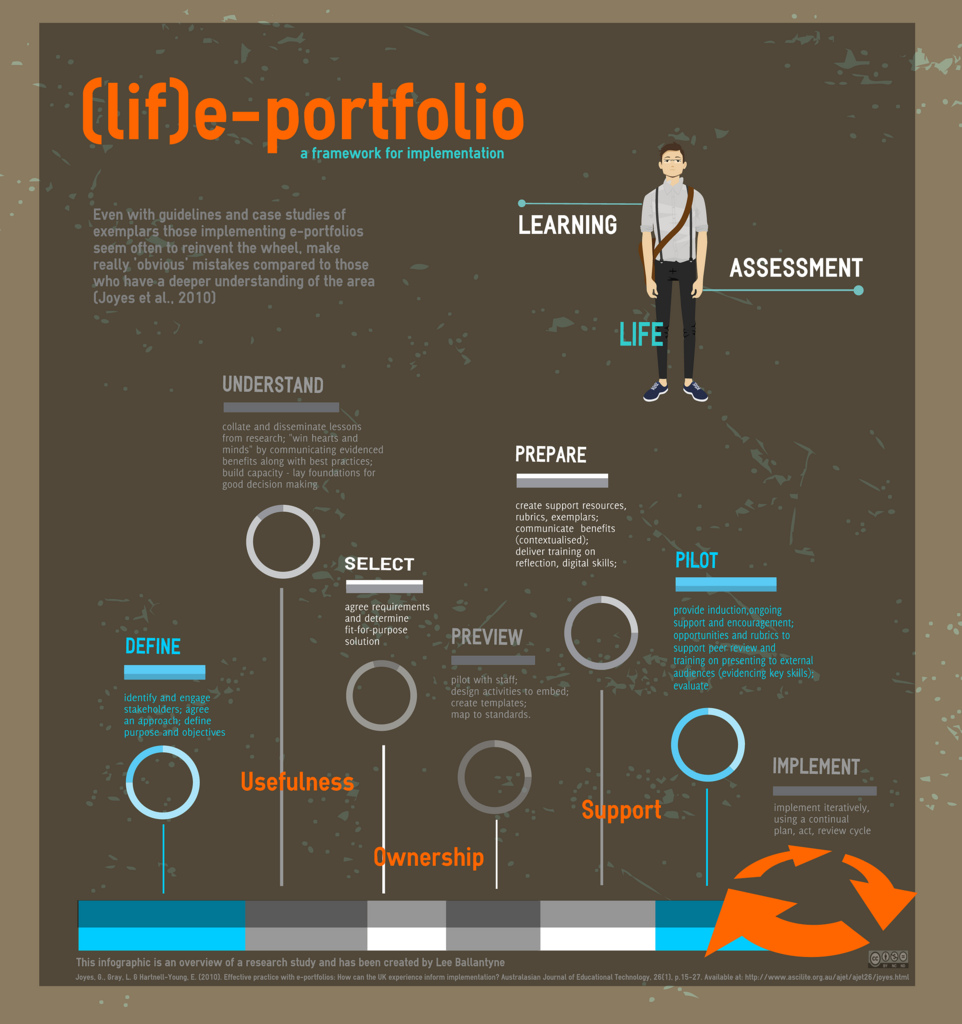
Another visual resource which I found very useful was the infographic below taken from the blog post http://www.pontydysgu.org/2013/02/issues-in-developing-and-implementing-e-portfolios/ . The blog post mentions the original article which inspired the infographic in which a dichotomy is  brought forth:  e-portfolios for LEARNING X e-portfolios for ASSESSMENT.

Diagramme: @lee74 (some rights reserved) http://www.flickr.com/photos/lee8/7164889790/
I've been teaching online since 2009 and I've used different tools to have my students create digital portfolios. First, I had my students use BLOGGER for their blog-portfolios. Then, for many years I opted for the POSTEROUS platform which was very easy to use as you could post by sending e-mails. However, unfortunately, Posterous has closed down and if you haven't exported it to another platform, bad luck, the blogs are gone. This year, a few weeks before I started a new online course, I had to rush to find another alternative to Posterous and I ended up choosing TUMBLR, for its ease in publishing different media and its popularity. A drawback I found was that you can't easily leave and receive comments in TUMBLR so that would limit the type of communication I wanted.
I myself made use of a platform to create my own learning portfolio for one of the subjects I took at UFU, Universidade Federal de Uberlândia, while doing my M.A. in Linguistic Studies. We were free to choose what format of portfolio we created, either paper of digital and my choice was a wiki at WIKISPACES. My first doubt at the beginning of the semester was what to include in my digital portfolio for that specific subject at university. I decided to keep adding everything which I thought would be EVIDENCE of what I had been learning. 
Next semester, I'm moderating a new group for the CULTURA EDTECH online course and my choice for the webfolios is WEEBLY. It's super easy to create your Weebly blog / portfolio. I liked the way you can drag and drop elements into the editing dashboard and create your blog posts. Apart from being able to publish at the website, you can also download the weebly app and post on the go.
But these are not the only platforms we can use to create digital portfolios, there are many others. 
These are some of the blog posts I've curated on tools to create portfolios:
If you still wish to learn more about the topic, another great resource is this PREZI presentation


September 11, 2009